
Getting started with soldering can feel overwhelming, especially when faced with a wide range of tools and kits. Beginners often worry about choosing an iron that’s safe, reliable, and easy to handle for small electronics, repairs, or DIY projects.
This guide reviews the best beginner soldering irons, from simple plug-and-play pens to feature-rich stations. You’ll find options for every need, including portable models, accessory-rich kits, and safety-focused designs, so you can confidently select the right tool for your first soldering tasks.


Top 10 Best Beginner Soldering Iron
After reviewing and comparing the most popular Beginner Soldering Iron options, we identified the products that offer the best balance of quality, performance, and value.
1. Q-MING 60W Adjustable Soldering Iron Kit
For those starting out or handling occasional repairs, having a complete soldering kit simplifies the process and reduces the need for extra purchases. A well-rounded starter kit ensures you have all the essentials for basic soldering tasks, making it easier to learn and complete projects safely.
The Q-MING 60W Adjustable Soldering Iron Kit is ideal for beginners and home users who want a straightforward, portable solution. It includes everything needed to get started, from multiple tips to solder wire and flux, all in a compact package. This kit is best for those who value convenience and want to avoid piecing together separate tools.
- Adjustable Temperature (200–450°C): Lets you match heat to different tasks for better results
- Complete Kit with 5 Tips: Includes stand, sponge, solder wire, and flux for immediate use
- ON/OFF Switch for Safety: Easily powers down to save energy and prevent accidents
Compared to basic soldering irons, this kit prioritizes convenience and readiness over advanced features like digital displays. The tradeoff is fewer customization options, but it’s a practical, all-in-one choice for most home projects.
- Comprehensive starter kit
- Adjustable temperature control
- Includes multiple tips
- Portable and easy to store
- ON/OFF safety switch
- No digital temperature display
- Limited advanced features
2. MEAKEST 60W Premium 12-in-1 Soldering Kit

Running out of solder or flux mid-project is a common beginner frustration. Kits with larger consumable supplies help avoid interruptions and let you focus on learning soldering skills rather than restocking materials.
The MEAKEST 60W Premium 12-in-1 Soldering Kit is designed for users who want a generous supply of solder and paste, reducing the need for extra purchases. It’s well-suited for those planning multiple projects or group learning sessions.
- Increased solder and flux capacity: More solder wire and paste included for extended use
- Adjustable temperature range: 200–450°C for versatility across different electronics tasks
- Ergonomic, insulated handle: Comfortable grip and added safety for longer sessions
Compared to standard kits, this one emphasizes consumable quantity, making it a good fit for frequent use. The main tradeoff is a more basic accessory set, with fewer specialty tools included.
- Larger solder and flux supply
- Comfortable handle
- Temperature adjustment
- On/off switch for safety
- Good for multiple projects
- Fewer specialty accessories
- No digital display
3. Q-MING 100W LED Digital Soldering Iron Kit

High-power soldering irons are valuable for demanding tasks or frequent use, but safety is a key concern, especially in homes with children. Features like password locks add an extra layer of protection.
The Q-MING 100W LED Digital Soldering Iron Kit stands out for its powerful heating and unique child safety lock. It's a strong match for users who need extra wattage for tough jobs and want to minimize risk in shared spaces. This kit is especially suitable for advanced hobbyists or families with safety concerns.
- 100W High Power Heating: Handles heavy-duty soldering and heats up rapidly
- LED Temperature Display: Allows precise control and easy monitoring
- Password (Child Lock) Setting: Prevents unauthorized or accidental use
Compared to standard irons, this model prioritizes power and safety, but the extra features may be unnecessary for casual users. The tradeoff is a more complex interface and higher price.
- High wattage for tough jobs
- Child safety lock feature
- Digital temperature control
- Fast heat-up
- Portable pen-style design
- May be overpowered for light tasks
- Password setup adds complexity
4. Q-MING 80W LCD Digital Soldering Iron Kit
When you need to tackle a range of soldering tasks, fast heat-up and precise temperature control are essential. A versatile soldering iron can handle everything from electronics to jewelry repairs, making it a valuable tool for hobbyists and repair enthusiasts.
The Q-MING 80W LCD Digital Soldering Iron Kit stands out for its rapid heating and wide temperature range, supported by a clear digital display. This makes it easy to adapt to different materials and project requirements. It's a strong fit for users who want more control and flexibility in their soldering work.
- 80W High Power Heating: Reaches working temperature in about 20 seconds for quick starts
- LCD Digital Display: Shows real-time temperature for accurate adjustments
- Wide Temperature Range (180–480°C): Suitable for various soldering applications
Unlike simpler kits, this model emphasizes speed and adaptability, but it may be more than needed for occasional users. The tradeoff is a slightly higher learning curve for those new to digital controls.
- Fast heat-up time
- Digital temperature display
- Wide adjustable temperature range
- Multiple included tips
- Suitable for varied tasks
- May be complex for beginners
- Requires careful handling of digital controls
5. MEAKEST 60W 9-in-1 Adjustable Soldering Kit
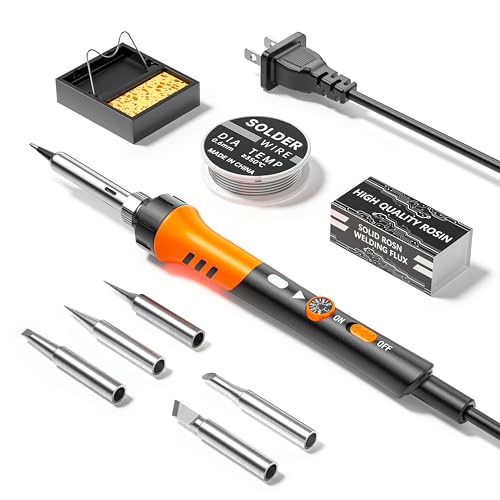
Budget-conscious buyers often need a reliable soldering solution without unnecessary extras or high costs. A simple, effective kit can make electronics repairs and small DIY projects accessible to everyone.
The MEAKEST 60W 9-in-1 Adjustable Soldering Kit is designed for affordability and ease of use. It offers essential features like adjustable temperature and multiple tips, making it a solid choice for students, hobbyists, or anyone new to soldering who wants to keep costs low.
- Adjustable Temperature (200–450°C): Supports a range of basic soldering tasks
- 5 Interchangeable Tips: Provides flexibility for different applications
- Ergonomic Handle with Silicone Cover: Enhances comfort and safety during use
Compared to more advanced kits, this model prioritizes simplicity and price. The tradeoff is fewer advanced features, but it delivers dependable performance for everyday repairs.
- Affordable price point
- Includes multiple tips
- Simple temperature adjustment
- Comfortable grip
- Good for beginners
- No digital display
- Basic accessory selection
6. Plusivo 60W Digital Soldering Iron 21-in-1 Kit

Having the right accessory at hand can make learning soldering much smoother. Beginners often benefit from kits that include not just the iron, but also tools for desoldering, wire prep, and safe storage.
The Plusivo 60W Digital Soldering Iron Kit is ideal for those who want a truly comprehensive set. With over 15 accessories, a digital display, and a portable carry bag, it’s perfect for home DIYers and hobbyists who want to be prepared for any project.
- 21-in-1 Accessory Set: Includes desoldering pump, tweezers, wire stripper, mini PCB, and more
- Digital Temperature Display (392–932°F): Allows precise heat control for different tasks
- Durable Carry Bag: Keeps all tools organized and easy to transport
Compared to standard kits, this set prioritizes completeness and organization. The tradeoff is a larger kit size and potentially more tools than a true beginner may need.
- Extensive accessory selection
- Digital temperature control
- Organized carry case
- Suitable for various tasks
- Bulkier to store
- May overwhelm absolute beginners
7. YIHUA 926 III 60W Digital Soldering Station Kit
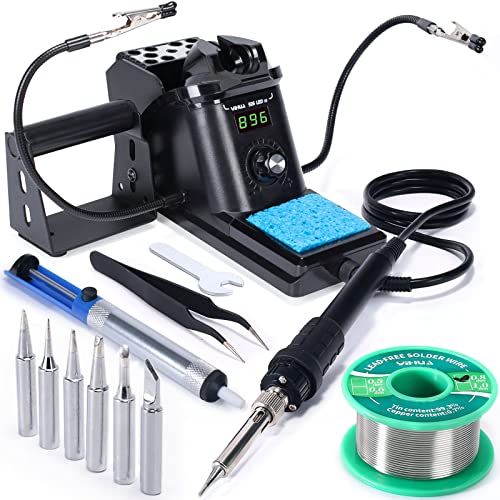
Holding small components steady is a challenge for beginners, leading to shaky joints or accidental burns. A soldering station with built-in helping hands can make precise work much easier and safer.
The YIHUA 926 III 60W Digital Soldering Station Kit is ideal for users who want extra stability and workspace organization. Its integrated helping hands and digital controls support more complex or delicate soldering tasks, making it a strong choice for those ready to move beyond the basics.
- Integrated helping hands: Securely hold wires or boards for more accurate soldering
- Digital temperature control: Wide range (194–896°F) with clear display for precise settings
- Space-saving station design: Combines iron holder, tip storage, and safety mesh in a compact footprint
Compared to portable kits, this station prioritizes stability and workspace efficiency. The tradeoff is less portability and a slightly steeper learning curve for setup.
- Built-in helping hands
- Digital temperature display
- Compact station design
- Sleep mode for safety
- Multiple tip options
- Less portable
- Requires more setup space
8. YIHUA 926 III 60W LED Soldering Station Kit
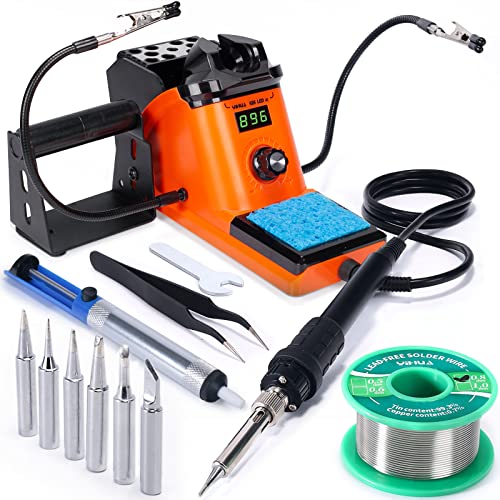
For users who want a dedicated workspace and a wide range of tools, a soldering station with multiple accessories can improve efficiency and organization. Having everything in one place streamlines complex projects and repairs.
The YIHUA 926 III 60W LED Soldering Station Kit offers a compact station with a generous set of accessories, including helping hands, multiple tips, and safety features. It's best for those who plan to do frequent or detailed soldering work and want a tidy, all-in-one setup.
- Integrated Soldering Station: Combines iron holder and control unit for space-saving convenience
- 15-Piece Accessory Set: Includes helping hands, solder, tips, and cleaning tools
- Adjustable Temperature (90–480°C): Covers a broad range of soldering needs
Compared to portable kits, this station prioritizes workspace organization and accessory variety. The tradeoff is less portability, making it better for a fixed workbench than on-the-go repairs.
- Comprehensive accessory set
- Integrated station design
- Wide temperature adjustment
- Space-saving layout
- Helpful safety features
- Less portable than pen-style irons
- Takes up more workspace
9. Liouhoum 80W LCD Adjustable Soldering Iron Kit
Maintaining consistent temperature and safety during soldering is crucial, especially for longer sessions or repeated tasks. Features like temperature memory and automatic sleep help prevent overheating and extend tool life.
The Liouhoum 80W LCD Adjustable Soldering Iron Kit is ideal for users who value convenience and safety. Its temperature memory function resumes your last setting, while the auto-sleep feature helps protect both the user and the iron. This kit is well-suited for frequent users who want reliable performance and added peace of mind.
- Temperature Memory Function: Recalls last used setting for quick restarts
- Automatic Sleep Mode: Reduces temperature after inactivity to prolong lifespan
- LCD Digital Display: Provides clear, accurate temperature readings
Compared to basic models, this iron prioritizes user safety and efficiency, but its extra features may not be necessary for occasional users. The tradeoff is a slightly higher cost for added convenience.
- Temperature memory feature
- Auto sleep for safety
- Digital display for precision
- Quick heat-up
- Comfortable handle
- Higher price than basic kits
- Learning curve for advanced features
9. Liouhoum 80W LCD Adjustable Soldering Iron Kit
Maintaining consistent temperature and safety during soldering is crucial, especially for longer sessions or repeated tasks. Features like temperature memory and automatic sleep help prevent overheating and extend tool life.
The Liouhoum 80W LCD Adjustable Soldering Iron Kit is ideal for users who value convenience and safety. Its temperature memory function resumes your last setting, while the auto-sleep feature helps protect both the user and the iron. This kit is well-suited for frequent users who want reliable performance and added peace of mind.
- Temperature Memory Function: Recalls last used setting for quick restarts
- Automatic Sleep Mode: Reduces temperature after inactivity to prolong lifespan
- LCD Digital Display: Provides clear, accurate temperature readings
Compared to basic models, this iron prioritizes user safety and efficiency, but its extra features may not be necessary for occasional users. The tradeoff is a slightly higher cost for added convenience.
- Temperature memory feature
- Auto sleep for safety
- Digital display for precision
- Quick heat-up
- Comfortable handle
- Higher price than basic kits
- Learning curve for advanced features
Buying Guide: How to Choose the Best Beginner Soldering Iron
Soldering irons are technical tools that require careful selection, especially for beginners. The right choice depends on your intended projects, workspace, and comfort with features like temperature control and safety. Many new users assume all soldering irons are similar, but differences in power, accessories, and design can significantly affect your experience.
- Pen-Style Irons vs. Station Kits: Pen-style irons are portable and simple, while station kits offer more stability and built-in accessories.
- Power Rating (Wattage): Higher wattage means faster heating and better performance on larger joints, but may be overkill for small electronics.
- Temperature Control: Adjustable or digital controls allow precise heat management, reducing the risk of damage or cold joints.
- Accessory Bundles: Kits with extra tips, solder, and tools can save money and hassle for beginners.
- Safety Features: ON/OFF switches, auto-sleep, and child locks help prevent accidents and extend tool life.
- Portability vs. Workspace Needs: Cordless models and compact kits are best for mobile work, while stations require a dedicated space.
- Common Misunderstandings: Many buyers overestimate the need for high power or advanced features, or underestimate the value of included accessories and safety functions.
Choosing Between Pen-Style Irons and Soldering Stations
The main decision for beginners is whether to start with a simple pen-style iron or invest in a full station. Pen-style irons are lightweight and easy to store, making them ideal for small repairs or portable use. Stations offer more stability, built-in holders, and often include helping hands or tip storage, which can be helpful for intricate electronics work.
- Pen-style irons are best for occasional users or those with limited space
- Stations suit users who want a dedicated workspace and extra stability
Understanding Power and Temperature Control
Wattage and temperature range directly affect how quickly your iron heats up and how well it handles different tasks. Beginners often think higher wattage is always better, but for most small electronics, 60–80W is sufficient. Adjustable or digital temperature controls help prevent overheating sensitive components.
- Higher wattage means faster heating but can be harder to control for fine work
- Digital displays make it easier to set and monitor temperature
Evaluating Accessory Kits and Extras
Accessory-rich kits can make a big difference for new users, saving time and money by including everything needed for basic projects. Look for kits with multiple tips, solder, flux, and storage solutions.
- Comprehensive kits reduce the need for extra purchases
- Extra accessories like desoldering pumps and tweezers are useful for troubleshooting
Safety and Convenience Features
Features like ON/OFF switches, auto-sleep, child locks, and ergonomic grips improve safety and ease of use. These are especially important in homes with children or pets, or for users who may forget to turn off their iron.
- Auto-sleep and memory functions help prevent accidents and extend tool life
- Child locks add peace of mind in shared spaces
Portability and Cordless Options
If you need to solder away from a workbench or power outlet, cordless models offer flexibility. However, they may have lower power and limited runtime compared to plug-in irons.
- Cordless irons are best for field repairs or mobile projects
- Plug-in models provide consistent power for longer sessions
Final Buying Advice
Choosing the right beginner soldering iron comes down to matching your needs with the features that matter most. Avoid overbuying on power or accessories if you’re just starting out, but don’t underestimate the value of safety and convenience features.
- Start with a kit that matches your project size and frequency
- Prioritize safety features if working in a shared space
- Choose digital or adjustable temperature control for versatility
- Opt for accessory-rich kits if you want to avoid extra purchases
- Don’t assume higher wattage is always better—balance power with control
FAQ For Beginner Soldering Iron
1. What wattage is best for a beginner soldering iron?
2. Do I need a soldering station or is a pen-style iron enough?
3. Are digital temperature controls necessary?
4. What safety features should I look for?
5. How important are included accessories in a kit?
6. Can I use a cordless soldering iron for all projects?
Related Posts
- Best Heavy Duty Dolly: Top 8 Picks
- Best Smartlock For Airbnb
- Best Taser For Women S Protection
- Best Budget Multi Process Welder
- Best Filler For 3d Prints
- Best Caulk For Toilet Base: Top 10 Picks
- Best Finish For Outdoor Wood Table
- Best Glue To Bond Metal: Top 8 Picks
- Best Superglue For Plastic: Top 6 Picks
- Top 10 Best Tactical Flashlight For Self Defense
- Best Battery Operated Closet Light: Top 10 Picks
- Best Construction Work Gloves
- Top 9 Best Height For Work Bench
- Best Tub Shower Conversion Costs Options Newark Oh: Top 9 Picks
- Best Sandpaper For Paint Removal: Top 10 Picks
- Top 7 Best Adhesive For Pvc
- Best Single Mode Flashlight
- Best Ventless Garage Heater
- Best Heat Pump Resistance Heating Which Is More Efficient Your: Top 6 Picks
- Top 6 Best Glue For Foam Insulation Board