
A malfunctioning or lost garage door remote can quickly become a daily frustration, especially in busy households or when multiple vehicles need access. Choosing a compatible, easy-to-use replacement is essential for maintaining convenience and security at home.
This guide reviews the best budget garage door opener remotes and keypads available today. We’ll help you compare universal remotes, keypads, and combo kits—so you can find the right fit for your garage system, whether you need a simple backup or a full family access solution.


Our Top 6 Best Budget Garage Door Opener Reviewed
After hands-on research and detailed comparisons, these Budget Garage Door Opener products stood out as the most dependable choices.
1. CreaCity Universal 3-Button Garage Remote (2-Pack)
Managing multiple garage doors or gates can be inconvenient when you need separate remotes for each. A universal remote with multi-channel support solves this by consolidating control into a single, easy-to-carry device.
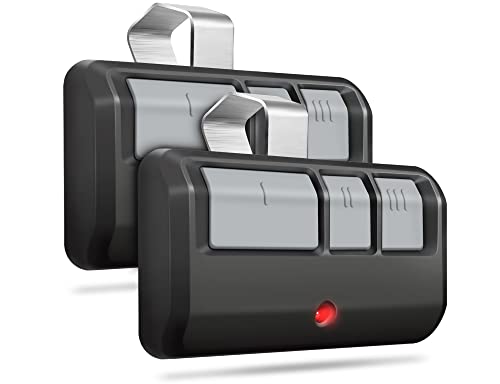
The CreaCity Universal 3-Button Garage Remote is ideal for busy households or anyone with more than one garage door. Its three-button design lets you operate up to three openers or gates, making it a practical choice for multi-car families or those replacing lost remotes.
- Three-Button Multi-Door Control: Operates up to three different openers or gates for maximum convenience.
- Rolling Code Security: Generates a new code each use to help prevent unauthorized access.
- 120-Foot Range: Provides reliable, no-wait access from a comfortable distance.
Compared to single-button remotes, this model prioritizes versatility and convenience, reducing remote clutter. The tradeoff is a slightly more complex setup, but most users will find the added flexibility worth it.
- Controls up to three doors
- Universal compatibility
- Pack of two remotes
- Strong security features
- Long operating range
- Slightly more setup required
- Larger than single-button remotes
2. LAWOHO Universal Garage Remote (2-Pack)
Replacing a lost or broken garage door remote shouldn’t require technical expertise. Many homeowners need a straightforward, reliable remote that works with common garage door brands.
The LAWOHO Universal Garage Remote offers easy programming and broad compatibility with LiftMaster, Chamberlain, and Craftsman openers. Its compact design fits easily on a keychain, making it a great choice for users who value portability and simplicity.
- Easy Three-Step Programming: Quick to pair with most openers, reducing setup hassle
- Mini Keychain Design: Lightweight and portable for everyday carry
- Rolling Code Technology: Enhances security by generating a new code each time
While some remotes offer more buttons or advanced features, this model focuses on user-friendly setup and portability. The tradeoff is that it’s best suited for those who only need basic control.
- Simple programming process
- Compact and lightweight
- Wide brand compatibility
- Secure rolling code tech
- Keychain-friendly
- Limited to basic functions
- May require mode switching for some openers
3. DDcafor 2-Button Universal Garage Remote Keychain
Carrying a bulky garage remote isn't always practical, especially if you want quick access on the go. A compact, keychain-friendly remote offers a portable solution without sacrificing essential features.
The DDcafor 2-Button Universal Garage Remote stands out for its lightweight, keychain-ready design, making it perfect for users who prefer to keep their remote with their car keys or in a pocket. With two buttons, it can control two separate doors or gates, offering flexibility in a small package.
- Compact Keychain Design: Easily attaches to keys or fits in a pocket for everyday carry.
- Dual-Button Operation: Controls two different garage doors or gates for added convenience.
- Rolling Code Security: Uses advanced encryption for enhanced protection against unauthorized access.
Unlike visor-clip models, this remote prioritizes portability and ease of access. The main tradeoff is the smaller button size, which may be less comfortable for those with larger hands.
- Fits on keychain
- Controls two doors
- Universal compatibility
- Strong security encryption
- Lightweight and portable
- Buttons may be small
- Not compatible with all brands
4. GIOATY Single-Button Garage Remote (2-Pack)
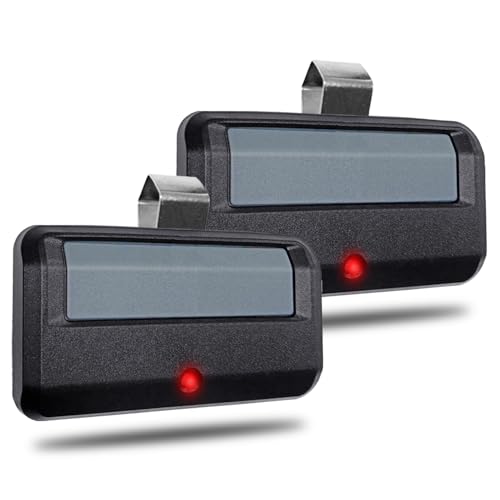
If you only need to control one garage door, a single-button remote offers straightforward, no-fuss operation. This type of remote is ideal for users who value simplicity and want to avoid accidental activation of the wrong door.
The GIOATY Single-Button Garage Remote is a great fit for single-door households or anyone seeking an easy replacement. Its intuitive pairing process and clear LED indicators make setup quick, while the included two-pack ensures you always have a backup.
- Single-Button Simplicity: Minimizes confusion and streamlines daily use.
- LED Status Indicators: Visual feedback for easy programming and troubleshooting.
- 160-Foot Range: Offers extended access from your vehicle or driveway.
Compared to multi-button options, this remote prioritizes ease of use and fast setup. The tradeoff is that it can only control one door per remote, so it's less flexible for multi-door garages.
- Simple single-button design
- Easy programming with LED
- Long range operation
- Two remotes included
- Clear instructions
- Controls only one door
- Not compatible with all brands
5. GIOATY Universal Garage Keypad

Keyless entry systems provide secure garage access without needing to carry a remote or key. This is especially useful for families, service providers, or anyone who prefers entering a code instead of using a clicker.
The GIOATY Universal Garage Keypad offers compatibility with most major brands and supports up to three doors. Its backlit buttons and weather-resistant design make it suitable for outdoor installation, while rolling code technology ensures secure operation.
- Supports Up to Three Doors: One keypad controls multiple openers for added convenience
- Backlit Buttons: Easy to use at night or in low light
- Rolling Code Security: Reduces risk of unauthorized access
Compared to remotes, this keypad prioritizes keyless convenience and family access. The tradeoff is that installation requires mounting and setup, which may not appeal to those seeking a plug-and-play remote.
- Keyless entry for added security
- Controls up to three doors
- Weather-resistant design
- Backlit buttons for night use
- Temporary password feature
- Requires installation
- Not compatible with Wi-Fi-only models
6. GONAT Universal Garage Remote (2-Pack)

Keeping a garage door remote within reach in your vehicle is essential for daily convenience. A remote with a visor clip ensures you never have to fumble for access when arriving home.
The GONAT Universal Garage Remote includes two remotes, each with a visor clip for hands-free control. With three buttons per remote, it’s suitable for households with multiple garage doors or gates. Clear instructions and broad compatibility make setup straightforward for most users.
- Visor Clip Included: Keeps the remote easily accessible in your car
- Three-Button Design: Controls up to three openers or gates
- Universal Compatibility: Works with most major brands from 1997 onward
Compared to keychain or keypad options, this model prioritizes in-car convenience and multi-door control. The tradeoff is that it does not support some older or less common opener brands.
- Visor clip for car use
- Controls up to three doors
- Two remotes per pack
- Clear setup instructions
- Universal compatibility
- Not compatible with all brands
- No DIP switch support
Buying Guide: How to Choose the Best Budget Garage Door Opener
Garage door opener remotes and keypads are essential for daily convenience and home security, but not all models are created equal. Buyers must consider compatibility, ease of setup, and the right balance between features and simplicity. Many assume all remotes are universal, but differences in frequency, security protocols, and brand support can lead to frustration if not checked carefully.
- Universal Remotes vs. Brand-Specific Models: Some remotes work across multiple brands (like LiftMaster, Chamberlain, and Craftsman), while others are designed for a single manufacturer (such as Genie). Always confirm compatibility with your opener’s model and year.
- Remotes vs. Keypads vs. Combo Kits: Remotes are ideal for in-car or keychain use, while keypads offer keyless entry for families or service providers. Combo kits provide both for maximum flexibility.
- Number of Doors Controlled: Multi-button remotes and keypads can operate several doors, which is useful for multi-car households. Single-button models are simpler but less versatile.
- Security Features: Rolling code technology is standard for modern remotes, generating a new code each use to prevent unauthorized access. Older systems may not support this.
- Programming and Setup: Some remotes offer one-button pairing or easy three-step setup, while others require more detailed programming. Keypads typically need to be mounted and programmed for each door.
- Common Misunderstandings: Not all "universal" remotes support every brand or model, especially older DIP switch systems or Wi-Fi-only openers. Always check for learn button color and compatibility lists before buying.
Choosing Between Remotes, Keypads, and Kits
The main decision is whether you need a simple remote, a keyless entry keypad, or a combination kit. Remotes are best for drivers who want quick, in-car access, while keypads are ideal for families, guests, or when you don’t want to carry a remote. Combo kits offer the most flexibility but require more setup.
- Remotes: Fast access from your vehicle or keychain
- Keypads: Secure, code-based entry for multiple users
- Combo Kits: Cover all access needs in one purchase
Matching Compatibility to Your Garage Opener
Compatibility is the most important factor. Most products in this guide support LiftMaster, Chamberlain, and Craftsman openers from 1993 onward, but some are Genie-only or exclude certain models. Always check your opener’s learn button color and model year before purchasing.
- Universal remotes: Good for mixed-brand households
- Brand-specific remotes: Best for Genie or other unique systems
- DIP switch and Wi-Fi models: Usually not supported by these budget options
Balancing Simplicity and Versatility
Single-button remotes are easy to use and program, making them ideal for single-door garages or users who want minimal fuss. Multi-button remotes and keypads add versatility for multi-door setups but may require more careful setup and labeling.
- Single-button: Streamlined, less chance of confusion
- Multi-button/keypad: More control, better for families or multiple vehicles
Installation and Everyday Use
Most remotes are ready to use out of the box with simple programming. Keypads require mounting and may need batteries replaced over time. Consider where and how you’ll use the device—visor clips are convenient for cars, while keychain models are best for on-the-go access.
Final Buying Advice
Choosing the right budget garage door opener comes down to matching your household’s needs with the right balance of compatibility, features, and ease of use. Don’t assume all remotes are interchangeable—double-check your opener’s requirements before buying.
- Check opener compatibility before purchase
- Decide if you need remote, keypad, or both
- Consider number of doors and users in your household
- Look for rolling code security for peace of mind
- Avoid overbuying features you won’t use—simplicity can be best for single-door homes
FAQ For Budget Garage Door Opener
1. How do I know if a garage door remote is compatible with my opener?
2. What is rolling code technology and why does it matter?
3. Can I use a universal remote with any garage door opener?
4. What’s the benefit of a keyless entry keypad?
5. How many garage doors can I control with one remote?
6. Are these remotes difficult to program?
7. What should I do if my remote stops working?
Related Posts
- Best Heavy Duty Dolly: Top 8 Picks
- Best Smartlock For Airbnb
- Best Taser For Women S Protection
- Best Budget Multi Process Welder
- Best Filler For 3d Prints
- Best Caulk For Toilet Base: Top 10 Picks
- Best Finish For Outdoor Wood Table
- Best Glue To Bond Metal: Top 8 Picks
- Best Superglue For Plastic: Top 6 Picks
- Top 10 Best Tactical Flashlight For Self Defense
- Best Battery Operated Closet Light: Top 10 Picks
- Best Construction Work Gloves
- Top 9 Best Height For Work Bench
- Best Tub Shower Conversion Costs Options Newark Oh: Top 9 Picks
- Best Sandpaper For Paint Removal: Top 10 Picks
- Top 7 Best Adhesive For Pvc
- Best Single Mode Flashlight
- Best Ventless Garage Heater
- Best Heat Pump Resistance Heating Which Is More Efficient Your: Top 6 Picks
- Top 6 Best Glue For Foam Insulation Board